
Asana and work management glossary
The terms used in every Asana implementation, explained in plain language: from tasks and projects to governed AI, portfolios and adoption. Use this quick reference to align your team’s vocabulary.
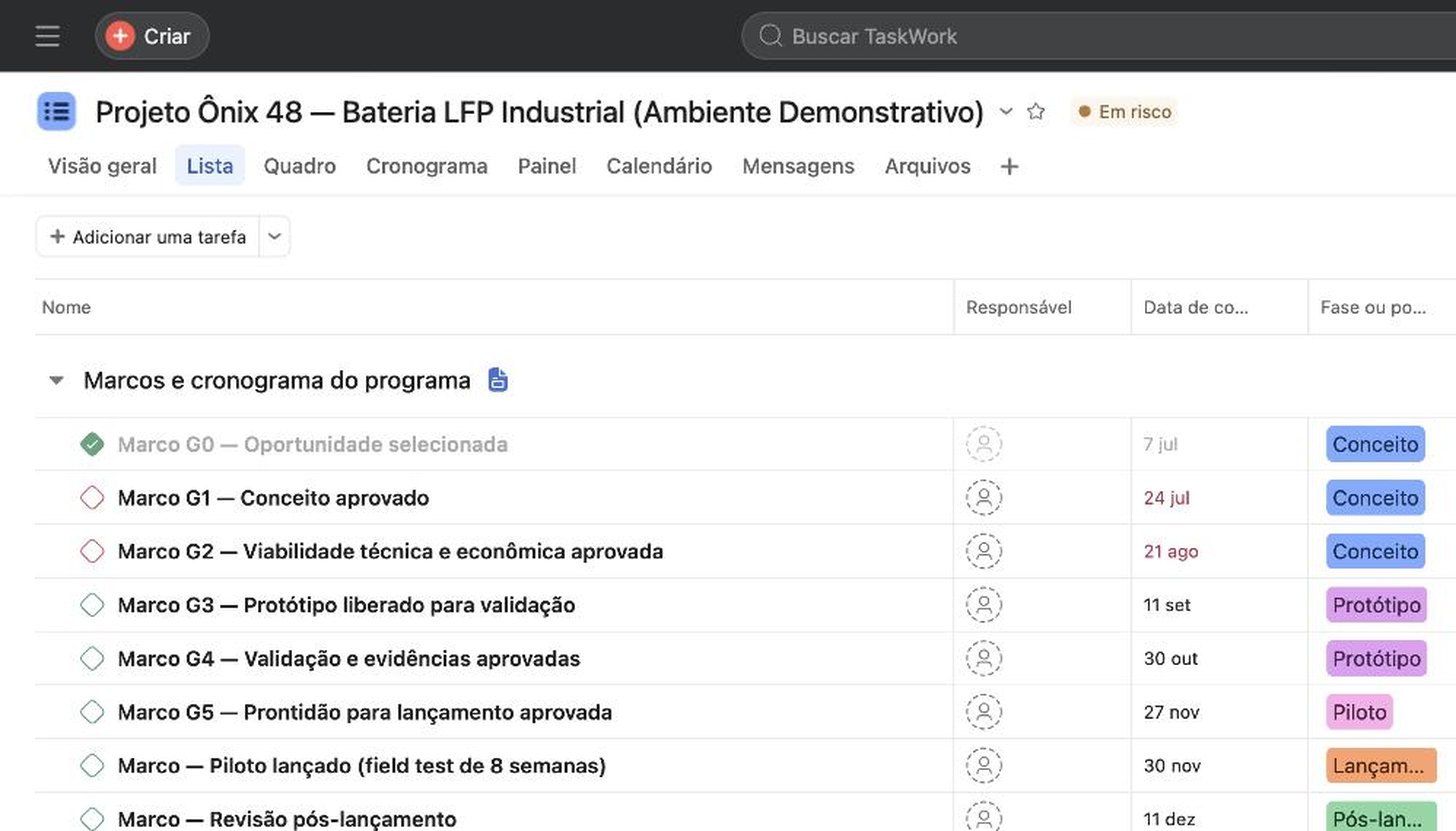
Work management is the discipline of organizing work, people and deadlines in one system: who does what, by when and why. Asana is the platform that puts this into practice. This glossary defines the concepts you encounter when structuring, measuring and scaling that operation.
Core concepts
Work management
The practice of coordinating all of an organization’s work, including projects, recurring processes and requests, in one system with clear owners, deadlines and priorities. It goes beyond project management to cover ongoing daily work.
Work Graph
Asana’s data model connects tasks, projects, portfolios, goals and people in a single graph. It lets you answer “who is doing what, toward which objective” without manually consolidating spreadsheets.
Agentic Work Management
An evolution of work management in which AI agents take part in execution, triaging requests, routing work and updating status, with defined human review points. Asana’s positioning treats AI as collaboration rather than unsupervised automation.
Intake
A standardized entry point for a team’s requests, usually a form that creates tasks with context, priority and an owner already in place. A single intake channel prevents requests from being scattered across emails and messages.
How work is organized in Asana
Task
The basic unit of work, with one assignee, a due date, description and subtasks. A task can belong to several projects at once without duplication, one of Asana’s structural advantages.
Project
A collection of tasks with a shared objective, such as a campaign, launch or recurring process. It can be displayed as a list, board, timeline or calendar without reorganizing the work.
Portfolio
A group of projects for executive oversight, bringing status, progress, deadlines and team workloads into one view. This is where leadership and the PMO get visibility into operations. See Portfolios.
Section and milestone
Sections divide a project into phases or categories; milestones mark key deliverables or dates. Together, they make progress visible without opening every task.
Dependency
A relationship between tasks in which one must wait for another. Dependencies feed into the timeline and let you reschedule connected deadlines when something is delayed.
Custom field
A configurable task or project attribute, such as priority, estimate, department or approval status. It provides the basis for reliable reports. Standardizing fields means standardizing the language of your operations. See Custom fields.
Template
A ready-made project or task structure that standardizes recurring work, such as onboarding, campaigns and sprints. Mature teams create their own templates. See Templates and playbooks.
Different ways to see the same work
List, board (Kanban), timeline and calendar
Asana displays the same project in four views without rework: a list for detail, a Kanban board for flow, a timeline (Gantt style) for dates and dependencies, and a calendar for scheduling. Each person uses the view that fits their role.
Workload
A capacity view by person within portfolios, showing who is overloaded and who has room for more. It helps redistribute work using data rather than impressions. See Workload.
Reporting and dashboards
Dashboards with real-time charts across projects and portfolios, covering status, bottlenecks and pending approvals. They replace manual weekly reports. See Reporting and dashboards.
From execution to goals
Goals and OKRs
The Asana layer that connects company objectives, such as OKRs, to the projects and tasks that deliver them. Goal progress updates from actual work rather than a separate spreadsheet. See Goals.
Workflow Builder and rules (automations)
A visual workflow builder: when an event occurs (a trigger), Asana takes actions such as moving a task, assigning an owner or sending a notification. Well-designed automation removes the overhead of coordinating work. See Workflow Builder.
Approvals
A special task type with a formal decision: approve, request changes or reject. It makes decisions traceable instead of leaving them buried in email threads. See Approvals.
AI in Asana
AI Studio
A no-code workflow builder with AI agents inside Asana. Agents triage, classify, summarize and route work according to team-defined rules. Available on eligible paid plans, with additional options available for purchase. See AI Studio.
AI Teammates
Prebuilt Asana AI agents for specific functions, such as request triage, project monitoring and status preparation. They join workflows as teammates with a defined scope and human supervision. See AI Teammates.
Asana Dash
An AI chief-of-staff assistant that follows email, calendars and projects, being rolled out gradually by Asana. See Asana Dash.
MCP (Model Context Protocol) and connectors
An open standard that allows external AI agents to work securely with Asana data, connecting the platform to the company’s AI ecosystem. See MCP and connectors.
AI governance
A set of controls for using AI safely, including agent scope, human review points, audit trails and data access policies. It distinguishes AI that can scale from AI that creates liabilities. See AI governance.
Making the platform worth the investment
Assessment
A structured assessment of work management maturity: where operations lose visibility, repeat work or miss deadlines, and a prioritized roadmap to address it. The recommended starting point. See Assessment.
Health Check
A technical review of an existing Asana environment: structure, fields, automations, permissions and actual use compared with potential. See Health Check.
Center of Excellence (CoE)
An internal team that sets standards, trains teams and continuously improves platform use, preventing the environment from deteriorating over time. See Center of Excellence.
Change management
Structured adoption work covering communication, training, executive sponsorship and usage measurement. A tool without adoption is a cost. See Change management.
Rollout
A planned expansion of the platform to new departments in waves, with readiness criteria and adoption targets for each phase. See Cross-department rollout.
Want to see these concepts applied to your operations?
In 30 minutes, we map where your company loses visibility and what to structure first in Asana.